
How to add an MCP server to Claude
Short answerA practical guide to adding a remote MCP server to Claude, with OAuth, permissions, approval steps and honest limits.
Written with AI assistance
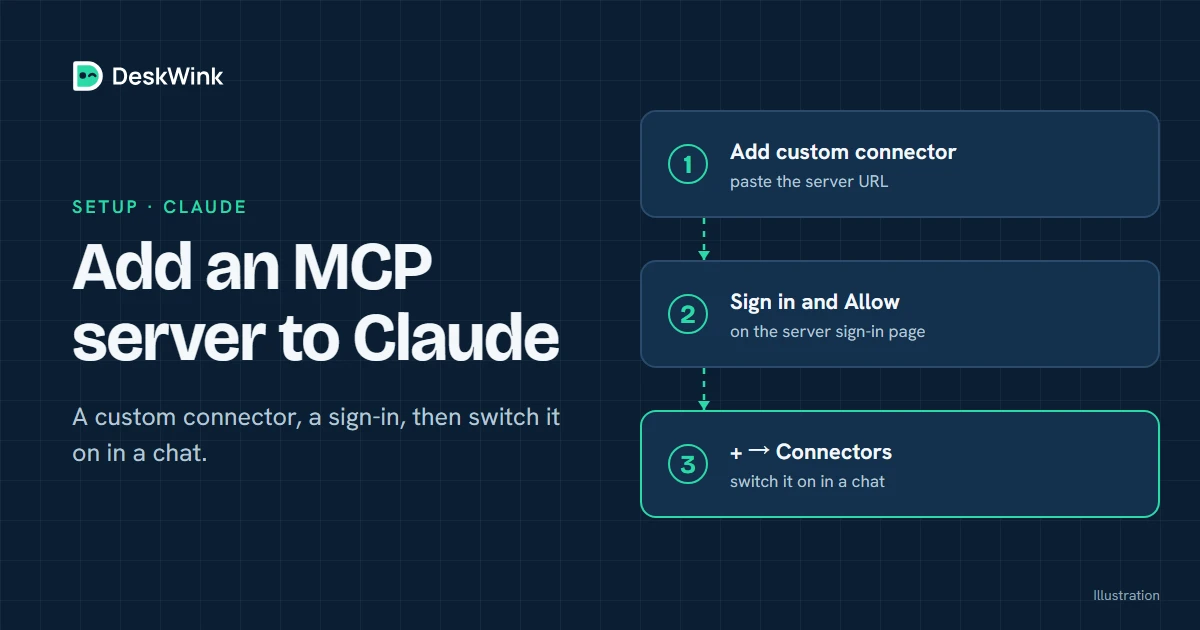
To add an MCP server to Claude, use the current custom connector or Claude Code setup documented by Anthropic, enter the server's remote HTTPS address, and approve the requested scopes. Start with a read-only test, then check every proposed change before you allow it to run.
Which Claude product are you using?
Claude has more than one surface. Claude on the web, Cowork and Claude Desktop may present a custom connector differently from Claude Code. Anthropic's remote MCP connector guide is the current reference for the web connection. The Claude Code MCP quickstart covers the command-line workflow.
Check the page on the day you connect the server. Menus, plan rules and rollout status can change. If a workspace administrator controls connectors, ask for the approved route rather than creating an unreviewed account.
Prepare the connection
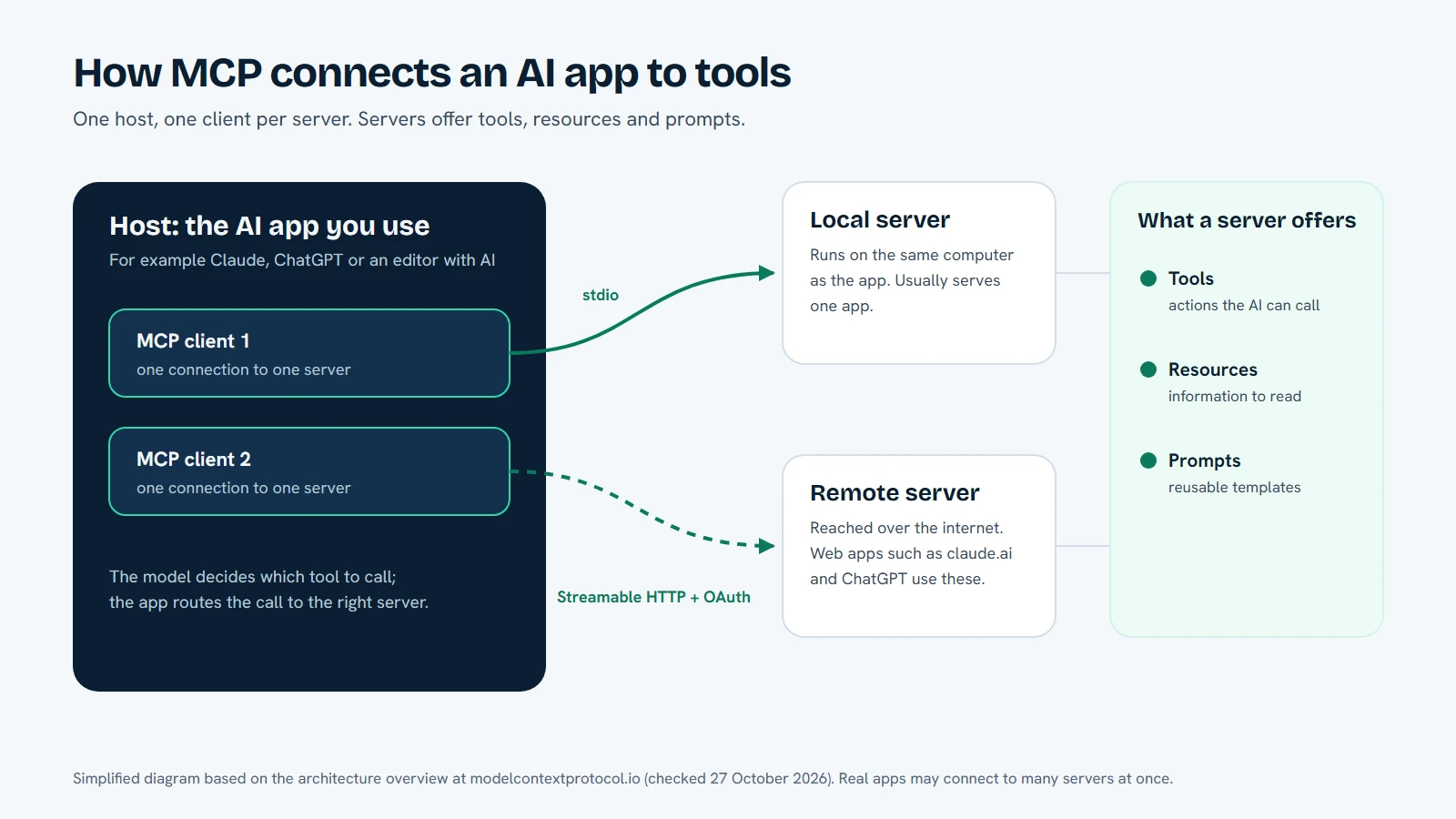
You need a remote MCP URL, an account that can add a custom connector, and a service that explains its authentication and data handling. A remote URL must use HTTPS and belong to the service you intend to use. A local command such as npx is a different connection method and is normally used by a local Claude client, not by the hosted web surface.
For DeskWink, read Connect Claude and Connect your AI. DeskWink's command-line agent runs on your Windows PC or Mac, while the MCP endpoint gives Claude a stable remote address. The agent and the cloud router have separate roles, so the device does not receive your Claude OAuth token.
Add a custom connector in Claude
The wording may move, but this sequence is the part that matters.
1. Copy the official server address
Open the service's official documentation and copy the remote MCP endpoint. Do not take a URL from an unknown post. Confirm the spelling of the domain, the use of HTTPS and the absence of a private token in the address.
DeskWink publishes its current connection addresses in the product documentation. Use those addresses instead of guessing a path from the public marketing site. A stable name such as DeskWink personal folders makes it easier to audit the connection later.
2. Open the custom connector screen
In Claude, open the settings or connector area described by Anthropic's current help article. Choose the option for adding a custom connector or remote MCP server. If the option is absent, the account, workspace or current product surface may not support it yet.
Do not weaken a browser or workspace security setting to make the menu appear. A missing option is an access decision, not a technical error to evade.
3. Enter the URL and review the identity
Paste the HTTPS URL and give the connector a descriptive name. Claude should send you to a sign-in or consent screen. Check that the domain is the one you expected and that the account shown is yours. If the consent screen names a different organisation, stop and investigate.
4. Choose the smallest scope
Start with read access if the service offers separate scopes. With DeskWink, a new install covers the whole computer, with every ability on (files, commands, the browser through the extension, and desktop control and the clipboard on Windows) and changes going through without asking.
You can limit that in the computer's settings, on the website or on the computer: choose folders instead of the whole computer, turn abilities off, and raise the approval level so changes wait for your approval. Read the security model before you decide.
The protocol can describe a write tool, but that description does not make the tool safe. The server and device must still enforce the account and the settings you chose. Treat tool descriptions as information to review, not as permission from the file owner.
5. Test a small read-only request
In Claude, click + and then Connectors, and switch DeskWink on. Then ask Claude to list one harmless folder or read a document you created for testing. The answer should show only the files you allowed. If Claude sees nothing, check the local agent pairing and the computer's settings before changing the connector scope.
6. Review a proposed write
Ask for a reversible change, such as creating a new file in a test folder. If you raised the approval level, read the path, operation and explanation, and approve only if they match your request. At the default level DeskWink applies the change without asking, after saving a copy of the original on the computer so deskwink restore can put it back.
If Claude proposes a change because a document told it to do so, ask it to explain the reason and check the document yourself before you let anything proceed.
Claude Code uses a different local flow
Claude Code can use local or remote MCP servers through its command-line configuration. A local server may be started by a command, while a remote server can use a supported HTTP transport or a local bridge. Follow the Claude Code MCP quickstart for the current syntax.
Keep secrets out of shell history, source files and issue comments. Use the credential mechanism documented by the service. DeskWink's repository workflow uses a draft-only token for its blog automation and keeps the value in a git-ignored file. That is a different resource from the user's computer access and should not be reused for another connector.
How DeskWink handles a Claude request
Claude sends a structured tool request to DeskWink's remote MCP endpoint. DeskWink checks the authenticated grant and the workspace policy. An outbound connection carries the request to the paired device, where the computer's settings apply.
Those settings are the authority. A request outside the folders you chose is refused if you limited DeskWink to folders. A file change waits for approval if you raised the approval level. The website can limit a computer at any time, and it can widen one only when website settings are on, after a recent sign-in, with a security event and an email to the account. No file contents or diffs are written to DeskWink's database or logs. These are DeskWink product behaviours, not promises made by MCP or Claude.
Claude can also connect to services that do not involve your computer. The same review questions apply: what data crosses the network, what the server stores, which account is acting, and how you revoke the connection.
Troubleshoot the first connection
The custom connector option is missing
Read Anthropic's current help article and check the account or workspace policy. The feature may be in a limited rollout or restricted by plan. Do not paste credentials into a third-party bridge just because the normal option is absent.
Claude reports an authentication error
Read the domain in the error and confirm the consent flow finished. A stale grant can also cause a failure. Disconnect the connector, revoke the old grant at the service, and connect again through the documented URL.
The agent is paired but no folder is visible
On the computer, check that the agent is running. A new DeskWink install covers the whole computer, so if you limited it to folders, open the computer's settings and confirm that the folder is one of them. The request also has to arrive for the same account and workspace.
Claude asks for an operation you did not request
Decline it. Inspect the conversation and any document that influenced the proposal. Prompt injection can make an AI repeat instructions hidden in a page or file. Text inside a file is not an authority to change your device policy.
A routine that keeps access understandable
Use one connector for one purpose. Keep a read-only research folder apart from a folder where Claude may create drafts. Review the connected apps list and remove grants you no longer need. If a teammate asks for access, give them a workspace policy designed for that job instead of sharing your personal token.
When a task is complete, disconnect Claude or stop the local agent if you do not need the connection to remain available. Reconnect it when the next task begins. This small habit makes old permissions easier to find and question.
Remote MCP is not a Claude plan change
Adding a connector does not change Claude's plans, message limits or usage rules. Claude decides whether a connector is available on the account and how the product handles its own limits. DeskWink provides a route to your computer and has its own beta and plan rules.
Do not describe a remote MCP server as a way to get around an AI provider's restrictions. Use the connection for the capability the provider documents, and keep the service's scope narrow.
Frequently asked questions
Can Claude on the web use a local MCP server?
The hosted Claude surface needs a remote connection that it can reach. A local process on your computer is not automatically visible to Claude's cloud. Use Anthropic's documented custom connector flow or use a supported local configuration in Claude Code or another local client.
Can I add DeskWink to Claude Code and Claude on the web?
DeskWink documents both connection paths. The exact menus and plan conditions belong to each Claude product, so follow Connect Claude and Anthropic's current help pages for the surface you use.
Does DeskWink ask before changing a file?
Not by default. A new install lets changes through without asking, and it saves a copy of the original on the computer first, so deskwink restore can put it back. Every action shows in Activity. If you want to check each change, raise the approval level in the computer's settings and it waits for you.
Is an MCP server automatically safe because Claude shows it in a connector menu?
No. The menu confirms that Claude can connect to the endpoint. It does not prove what the server stores or what its tools can do. Read the service's permissions, security model and revocation instructions.
Next step
Start with the DeskWink Claude guide, pair one computer and limit it to one test folder in its settings. Keep the first Claude request read-only. See the pricing page for DeskWink's own plan status and the troubleshooting guide when a concrete error appears.
Frequently asked questions
Can Claude on the web use a local MCP server?
The hosted Claude surface needs a remote connection it can reach. Use Anthropic's documented custom connector flow.
Can I add DeskWink to Claude Code and Claude on the web?
DeskWink documents both paths, but the exact menus and plan conditions belong to each Claude product.
Does DeskWink ask before changing a file?
Not by default. A new install lets changes through and saves a copy of the original first, so deskwink restore can put it back. Raise the approval level in the computer's settings to make each change wait for you.
Is an MCP server automatically safe because Claude shows it in a connector menu?
No. The menu confirms that Claude can connect; it does not prove what the server stores or what its tools can do.
Let the AI you already use work with your own files, with the limits you choose in your DeskWink settings.