
Local MCP vs remote MCP: which should you use?
Short answerCompare local and remote MCP servers by setup, reachability, data flow and permissions, then choose the safer fit for your AI app.
Written with AI assistance
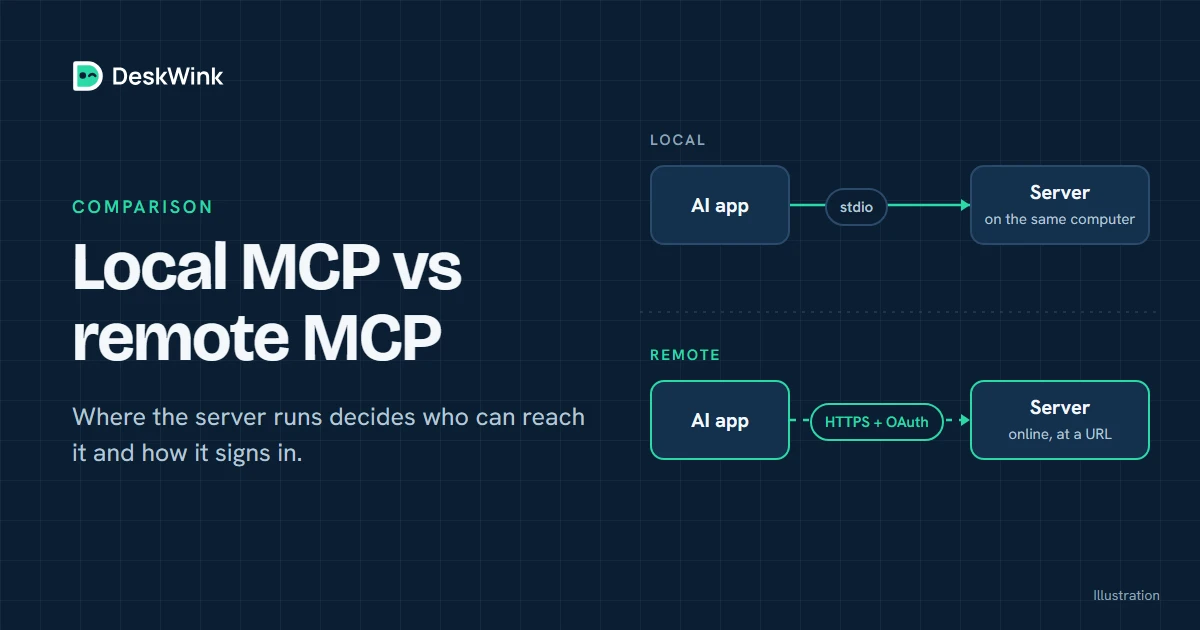
Local and remote MCP servers solve the same problem in different places. A local server runs beside the AI host. A remote server is reached over HTTPS. Choose by asking where the AI runs, what data crosses the network, which permissions it needs and how access can be revoked.
What local and remote mean
The Model Context Protocol gives an AI application a common way to discover tools and request results. It does not decide where a server runs. That is the job of the host and the server deployment.
A local MCP server is started by the host on the same computer, or on a private machine that the host can reach. The connection is often a local process using standard input and output. This is common in development tools and desktop applications. The server may be able to see local files, processes or environment variables, depending on how it was started.
A remote MCP server publishes an HTTPS endpoint. The AI client opens a network connection to that address and usually signs in before it can call tools. The server can run in a cloud, on a private server, or as a public front door to an agent running on another computer.
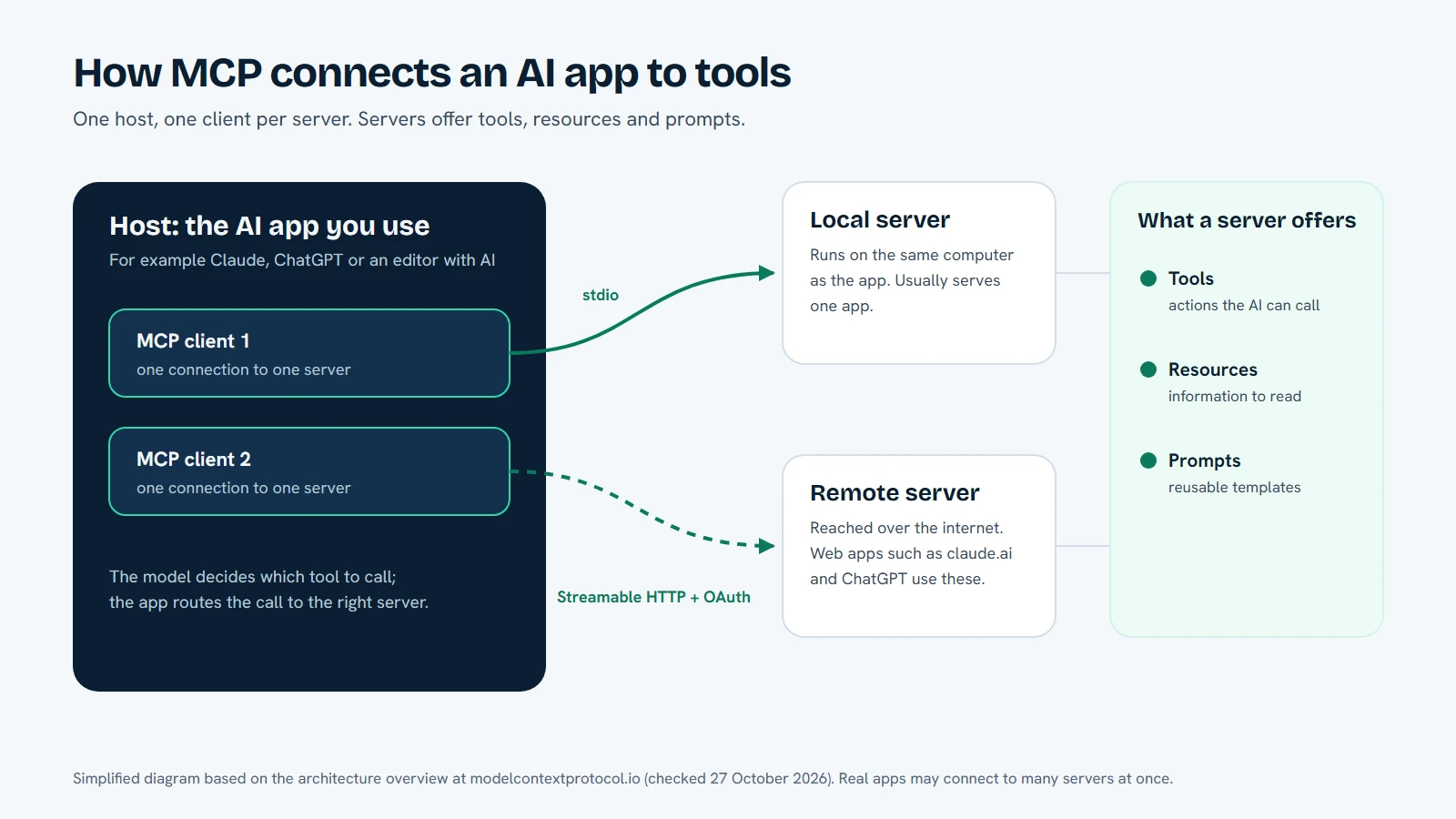
The word remote describes location. It does not tell you whether the server is trustworthy or whether it can write files. A read-only documentation server and a computer-control service can both be remote MCP servers.
Local versus remote at a glance
| Question | Local MCP server | Remote MCP server |
|---|---|---|
| Where does it run? | On the AI host or a nearby private machine | On a hosted service or a device reachable over HTTPS |
| How does the client connect? | A local process or private network address | A public or private HTTPS URL |
| What is easiest? | Fast development and private experiments | Hosted AI apps and shared access |
| What crosses a network? | Depends on the host; often little leaves the machine | Requests, results and any data the tool returns cross the network |
| What must you review? | Process permissions, local account, filesystem roots and secrets | Domain identity, TLS, OAuth, scopes, retention and revocation |
| How do you disconnect? | Stop the process and remove the local configuration | Revoke the grant, remove the connector and stop the remote agent |
The table is a starting point, not a security score. A badly configured local process can expose a whole home directory. A carefully designed remote service can restrict a request to one folder and require approval before a write.
Choose a local server when the host is local
Local MCP is a good fit when the AI application itself runs on your computer and the tool needs to stay close to local data. A developer may want a short edit-test loop, a private script may need a local database, or a desktop application may already have a clear permission boundary.
The local arrangement also avoids making a service reachable from the public internet. That can reduce the number of network components to review. It does not remove the need to review the process account, command arguments, environment variables, filesystem roots and logs.
Before starting a local server, check the command it runs. Read the configuration instead of pasting a sample blindly. Keep API keys, browser profiles, private keys and .env files outside the directory you share. If the host can start arbitrary commands, treat the server as a program with the same authority as its local account.
Local servers are also a poor fit for a hosted AI app by default. A cloud assistant cannot normally reach localhost on your computer. Its request starts in the vendor’s environment, not in your terminal. Giving it a local URL requires an additional tunnel or bridge, which creates another trust boundary.
Choose a remote server when the client is hosted
Remote MCP is usually the practical arrangement for a web AI application. The client can open a stable HTTPS URL, show a sign-in and consent step, and send structured calls to a service that knows how to reach the intended resource.
Remote access is also useful when several approved clients need the same service, or when a computer should keep an outbound connection instead of opening an inbound port. The design still has to say which account is acting, which resources are allowed, what the service stores and how access is revoked.
The public URL deserves careful checking. Use the domain published by the service. Confirm HTTPS and the organisation behind the domain. Watch the consent screen: it should name the right client, request understandable scopes and give you a way to cancel.
Compare the trust boundaries
The most useful comparison is not “local good, remote bad”. Ask where each decision is made.
- Identity: Does the server know which account and client made the request?
- Capability: Does it expose only the tools the task needs?
- Resource scope: Does a file tool allow one chosen root, or the entire disk?
- Approval: Can a person see and reject a write or command before it runs?
- Data handling: Are file contents, arguments, results and security events retained?
- Recovery: Can you revoke the client, stop the agent and remove the local grant?
MCP describes the conversation between client and server. It does not automatically answer these questions. The service and the local agent still need their own policy.
A practical decision sequence
Use this sequence before you choose a deployment:
- Name the AI host. If it is a local desktop application, local MCP may be available. If it is a hosted web app, start with a remote endpoint.
- Name the resource. Write down the folder, database or service the tool must reach. Avoid “everything on the computer”.
- Start read-only. Test listing or reading a harmless file before enabling a write or command capability.
- Check the connection. Confirm the URL or local process, the account shown by the consent screen and the scopes requested.
- Test a low-impact request. The result should show the expected tool and resource. Reject anything that names a path or action you did not intend.
- Practice revocation. Disconnect the AI app, revoke its grant and stop the local component. You should know what remains connected after each step.
This process takes longer than copying a configuration file, but it gives you a clear answer when something behaves differently later.
Where DeskWink fits
DeskWink is built for the hosted-client case. You run its command-line agent on your Windows PC or Mac, pair the computer and connect an AI app to DeskWink’s remote MCP endpoint. The cloud router sends a request to the paired device over an outbound connection.
The settings live on the computer, and you can change them. A new install starts with the whole computer, every ability (files, commands, the browser through the extension, and desktop control and the clipboard on Windows) and changes going through without asking, with no time limit. In the computer's settings, on the website or on the computer, you can limit it: choose folders instead of the whole computer, turn abilities off, or raise the approval level so changes wait for your approval.
Before DeskWink applies a file change it saves a copy of the original on the computer, so deskwink restore can put it back, and every action shows in Activity. The website can widen a computer's settings only when website settings are on for it, after a recent sign-in, with a security event and an email to the account. No AI app can do that.
DeskWink does not store file contents or diffs in its database or logs. It is in closed beta, so read the security model and getting started guide for the behaviour available today. The arrangement does not change the AI provider’s plans or usage rules. It only gives the client a remote endpoint and gives the paired computer a policy boundary.
When neither choice is ready
Pause if you cannot identify the owner of the server, the data it retains or the way to revoke access. Pause if the setup asks you to disable a protection, paste a long-lived secret into a chat or grant a whole computer when the task needs one folder.
You can also keep the deployment split. A remote MCP endpoint can handle identity and consent while a local component performs the sensitive work. In that design, the remote layer should pass only the minimum request and the local layer should still check the current policy.
A low-risk migration path
If you are moving from a local experiment to a hosted client, do it in stages. First record the local tool’s exact commands, environment variables and filesystem roots. Then create a remote endpoint that exposes only a read-only health check. Connect a test client and compare the tool name, account identity and returned data with the local result. Next add one chosen project folder, still read-only, and confirm that the remote service rejects a path outside that root. Only after those checks should you add a write operation, and that operation should use a disposable file or branch.
Keep the local configuration until the remote path has passed revocation testing. If the remote service is unavailable, you should be able to stop using it without losing the local workflow or leaving a second connector active. Document who owns the endpoint, which client is approved, which scopes are granted and which person can revoke them. This record is more useful than a vague label such as “internal MCP”.
What to read next
Start with Connect your AI, then read the security model. If you are comparing a hosted client with a local tool, keep the remote MCP guide beside the decision table. DeskWink’s pricing page explains its own plan status; it does not change the plans of the AI apps you connect.
Frequently asked questions
Is a local MCP server safer than a remote one?
Neither arrangement is safe by default. Review identity, permissions, data handling, approval and revocation for the specific server.
Can a hosted AI app use a local MCP server?
A hosted app normally needs a remote HTTPS endpoint. A localhost process is visible to the machine that starts it, not automatically to a vendor cloud.
Where does DeskWink fit?
DeskWink provides a remote MCP endpoint and routes requests to a paired computer. A new install covers the whole computer, and you can limit it to folders you choose in the computer's settings.
Does remote MCP change an AI provider plan?
No. The connector remains subject to the AI provider’s own plans and rules.
Let the AI you already use work with your own files, with the limits you choose in your DeskWink settings.