
What is a computer use agent?
Short answerComputer use agents can click and type through a graphical interface. Learn what they do, where they fail, and how to use one safely.
Written with AI assistance
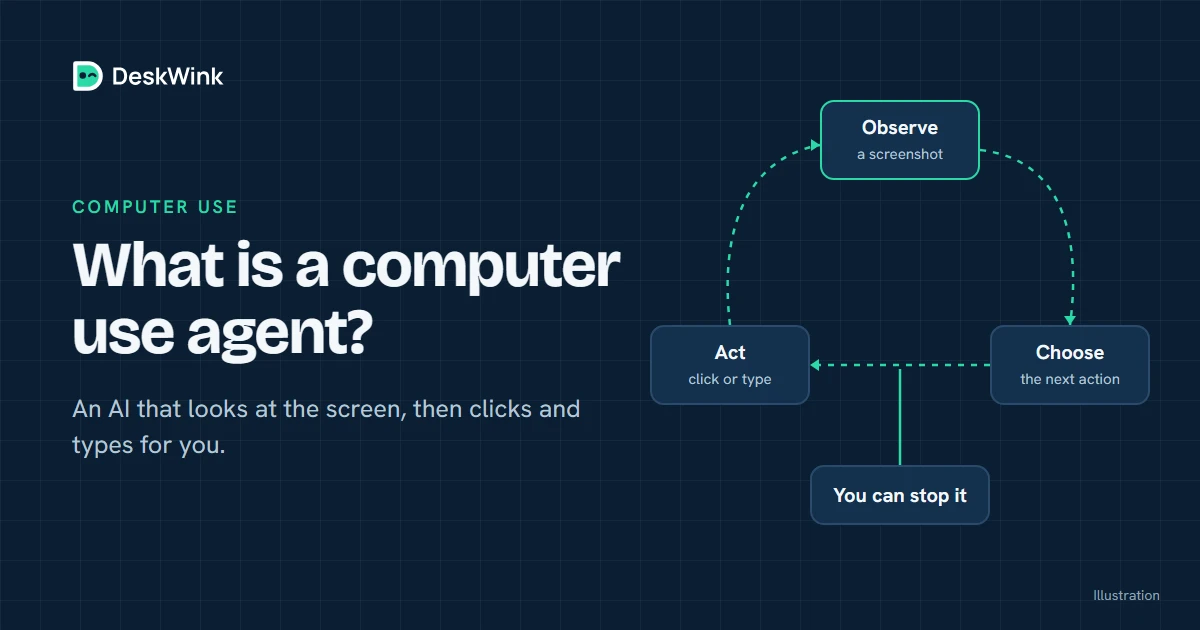
A computer use agent is an AI system that can observe a graphical interface and propose actions such as moving a pointer, typing text or selecting a control. It can help with tasks that do not have a clean API, but it also inherits the risks of a person acting through the same interface.
What computer use means
Most software integrations work through a structured API. An API gives the client named operations and predictable fields. Computer use is different. The agent receives an image or a rendered interface, reasons about what it sees and chooses a mouse or keyboard action.
That makes a computer use agent useful for a long tail of tools: an old desktop program, a web form with no public API, or a workflow that crosses several applications. It also makes the boundary harder to describe. A click can open a file picker, submit a form, download a file or confirm a transaction. The agent needs a clear policy and a human who can stop it.
The OpenAI computer use guide explains the tool from OpenAI's point of view. Google's computer use documentation describes a similar class of interaction. Product details change, so use the vendor's own documentation for the current model and controls.
Computer use is different from MCP
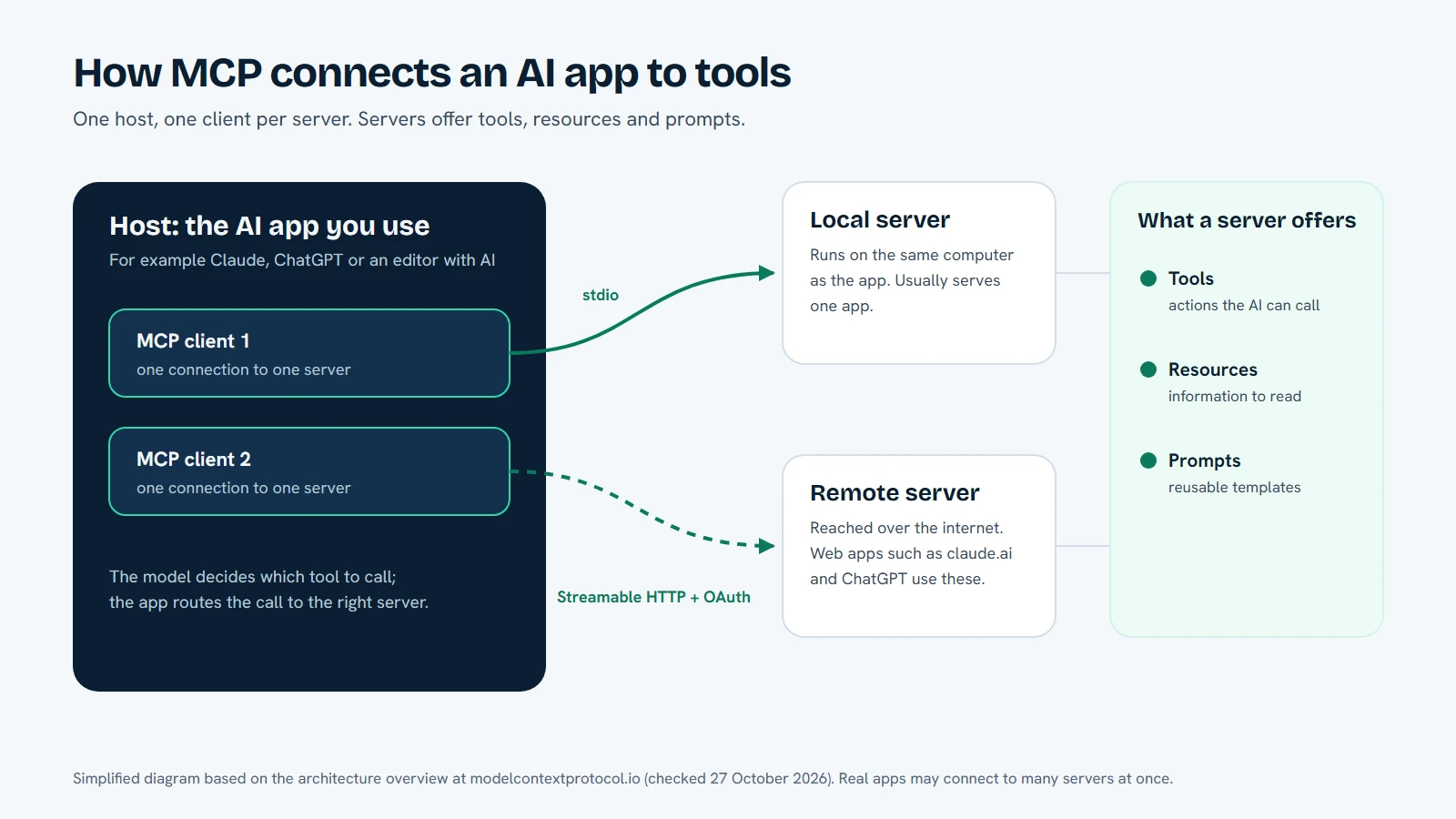
MCP is a protocol for connecting an AI client to a server that describes tools, resources or prompts. The server can expose a structured operation such as list files or create a report. Computer use is an interaction method. The agent uses a screen and input events to operate a graphical interface.
The two can work together. An MCP server can expose a tool that starts a controlled computer use session, or a local agent can provide structured file tools while a separate, optional module handles a graphical application. Do not treat the combination as one permission. File access, command execution, web operations and desktop control should have distinct scopes.
| Capability | What the agent receives | Typical strength | Main question to ask |
|---|---|---|---|
| Structured MCP tool | A named operation and its fields | Predictable data and clear validation | Which records or files can this tool reach? |
| Computer use | A screen or rendered interface and input actions | Interfaces without a useful API | What can a click, download or submit action trigger? |
| Command tool | A command and its output | Repeatable technical work | Which commands and working directories are allowed? |
The table is a reminder to keep permissions separate. An agent that can read a folder does not need permission to click through a payment page. An agent that can fill a form does not need permission to run a shell command.
A safe computer use loop
The safest useful workflow is deliberate and observable.
- Write the goal in one sentence. Say which application, account and result you expect. Avoid a broad instruction such as take care of everything in this account.
- Choose a bounded environment. Use a test account, a separate browser profile or a folder with harmless files. Remove saved payment methods and private documents from the test surface.
- Let the agent observe before it acts. The first step should be a screenshot or a page read. Confirm that it is looking at the right window and account.
- Review sensitive actions. Pause before a login submission, file upload, external message, deletion, purchase or permission change. A person should see the exact target and operation.
- Keep the task short. A small sequence is easier to inspect than an open-ended objective. Stop when the requested result is reached.
- Check the result yourself. An agent can report success after a click even when the interface rejected the request, changed a different field or opened a new page.
This loop is slower than giving an agent unrestricted control. It is also easier to recover when the model misreads a screen or follows an instruction embedded in a document.
Why prompt injection matters
A computer use agent can read text that you did not write: a web page, an email, a PDF or a downloaded file. That text can contain instructions aimed at the agent. A malicious page might tell the agent to copy a token, ignore a safety rule or upload a file. The words look like ordinary content to the model, but they are not an authority to change your policy.
Treat every outside page as untrusted input. Keep the agent away from accounts that hold more data than the task needs. Do not let a download directory become a command channel for a local agent. If the model repeats an instruction that came from a page, stop and ask it to identify the source.
How DeskWink separates device capabilities
DeskWink is built around a remote MCP connection to a command-line agent on your own Windows PC or Mac. File tools, command execution, browser operations and desktop control are separate abilities, each with its own switch. A new install starts with all of them on: the whole computer, every ability, and changes going through without asking, with no time limit. Desktop control and the clipboard are available on Windows only for now, and the browser ability works through the DeskWink extension.
You can limit all of this afterwards, in the computer's settings on the website or on the computer. Choose folders instead of the whole computer, turn abilities off, and raise the approval level so changes wait for your approval. Narrowing is always allowed. Before DeskWink applies a file change it saves a copy of the original on the computer, so deskwink restore can put it back, and every action shows in Activity.
That separation means a request for a document does not have to become a request to control the whole computer, if you switch off what a task does not need. The AI app cannot change these settings. The website can widen them only on a computer that has website settings on, after a recent sign-in, with a security event and an email to the account.
The agent is a CLI tool that you start with deskwink launch. It does not install a desktop tray client. The first launch does turn on a sign-in launcher, so the agent starts when you sign in to your computer, and it registers the browser extension's connection when Chrome or Edge is installed. deskwink autostart disable and deskwink browser setup --remove undo these. Read the security model and getting started guide for the exact behaviour in the beta. The product is in closed beta, so do not assume that every optional capability is available on every computer.
A computer use agent is not a person
The model does not share your intent. It predicts the next action from the goal, the screen and the instructions it can read. It may choose a technically valid button that has a different consequence from the one you imagined. It may also continue after a page has changed or a network request has failed.
Use precise targets. Name the application, record, folder and expected result. Ask for a pause when the task reaches a boundary. If a request involves money, legal terms, account recovery or a message to another person, keep the final action in human hands.
Choosing between an API, MCP and computer use
Prefer a documented API when one exists and the action is important. APIs expose clearer inputs, outputs and error states. Use an MCP tool when the server can present a narrow, reviewable operation that an AI client can call. Use computer use for an interface that cannot be reached safely in another way, and keep the session small.
| Situation | Prefer | Reason |
|---|---|---|
| Read a known record | API or structured MCP tool | The input and output are easier to validate |
| Work with selected local files | A scoped local agent or MCP tool | The folder policy can be explicit |
| Operate an old graphical program | Computer use with a test account | There may be no practical API |
| Submit an irreversible form | Human action after an agent prepares it | The final commitment is visible to a person |
If the agent can prepare a draft but a person can submit it, keep that boundary. Preparation and commitment are different jobs.
Practical checks for desktop control
Read the product's tool list and the local approval settings. Identify which operations can type, click, upload, download or launch an application. Check whether screenshots or action logs contain sensitive text. Confirm how to stop the agent and how to revoke its connection.
Use a separate operating-system account when the task involves an unfamiliar site. Remove browser extensions that are not needed. Keep the test folder free of private keys, session files and documents that contain instructions. Do not grant a computer use tool access to an administrator account when a standard account can complete the task.
When a task needs a browser, write a one-time policy for the allowed sites and actions. A broad allow-list is hard to review. A small list such as open this documentation page and extract the headings is easier to compare with the result.
Common failure modes
The agent clicks the wrong control
Stop the run and inspect the screenshot. Ask the model to describe the control it intended to use. If the interface is ambiguous, switch to a structured API or complete that step manually.
A page asks for a secret
Do not paste the secret into the agent's chat. Use the product's supported authentication flow, or take over the session yourself. A page can be legitimate and still be the wrong place to disclose a token.
A download contains new instructions
Treat the file as untrusted content. Do not ask the local agent to follow commands from a downloaded document without reading it. A file cannot grant itself permission to run code or change the device policy.
The agent cannot recover from a changed layout
This is a normal limitation of screen-based interaction. Use a shorter task, add a checkpoint or prefer an API. Do not compensate for a flaky selector by granting more access.
Frequently asked questions
Can a computer use agent read my files?
It can read files if the application or tool it controls has access to them. The safe boundary is the local account, folder policy and approval flow, not the label computer use. Review the exact scope before a run.
Is computer use the same as remote desktop software?
No. Remote desktop software gives a person a view and input channel. A computer use agent adds a model that chooses actions from a goal and what it observes. The model introduces a separate reasoning and prompt-injection risk.
Does DeskWink turn on desktop control by default?
On Windows, yes. A new install turns on every ability, including desktop control and the clipboard, and you can turn any of them off in the computer's settings. On a Mac, DeskWink's desktop tools are not available yet. Check the current security model before relying on them.
Should I let an agent complete a purchase?
Keep the final purchase action with a person. An agent can prepare a cart or explain the steps, but the amount, recipient and terms should be visible before you commit.
Next step
Start with a read-only folder task through DeskWink's getting started guide. Before you use it for anything graphical, open the computer's settings and limit what the task needs: pick a test folder, turn off abilities you do not need, and raise the approval level if you want to see each change first. The pricing page describes DeskWink's own plans and beta status.
Frequently asked questions
Can a computer use agent read my files?
It can read files when the application or tool it controls has access to them. Review the local account, folder policy and approval flow.
Is computer use the same as remote desktop software?
No. Computer use adds a model that chooses actions from a goal and what it observes, which creates a separate reasoning and prompt-injection risk.
Does DeskWink turn on desktop control by default?
On Windows, yes: a new install turns on every ability, including desktop control, and you can turn each one off in the computer's settings. DeskWink's desktop tools are not available on a Mac yet.
Should I let an agent complete a purchase?
Keep the final purchase action with a person. An agent can prepare a cart or explain steps, but the amount and terms should be visible before you commit.
Let the AI you already use work with your own files, with the limits you choose in your DeskWink settings.